Upcoming Improvements to Forms and Email Settings
This update introduces Form Previews and new options for customizing email sender details.
Form Previews
Form Previews allow departments to review forms exactly as applicants or faculty will see them. This makes it easier to verify layout, wording, and flow before the form is published.
The preview displays the complete structure of the form, helping ensure accuracy and consistency without requiring external test links or additional review steps.
The preview can be activated using the new Preview button, located at the top of the form builder page. Selecting this button will open a full, interactive preview of the form as it will appear to end users.
-
✓
Full visibility: Review the complete form layout in advance.
-
✓
Error reduction: Identify missing fields or unclear wording early.
-
✓
Efficient adjustments: Update and confirm changes in one place.
-
✓
Consistent presentation: Ensure forms meet departmental standards.
Preview Example
The preview reflects the final version of the form, including all fields, sections, and instructions. This helps confirm clarity and structure before making the form available to users.
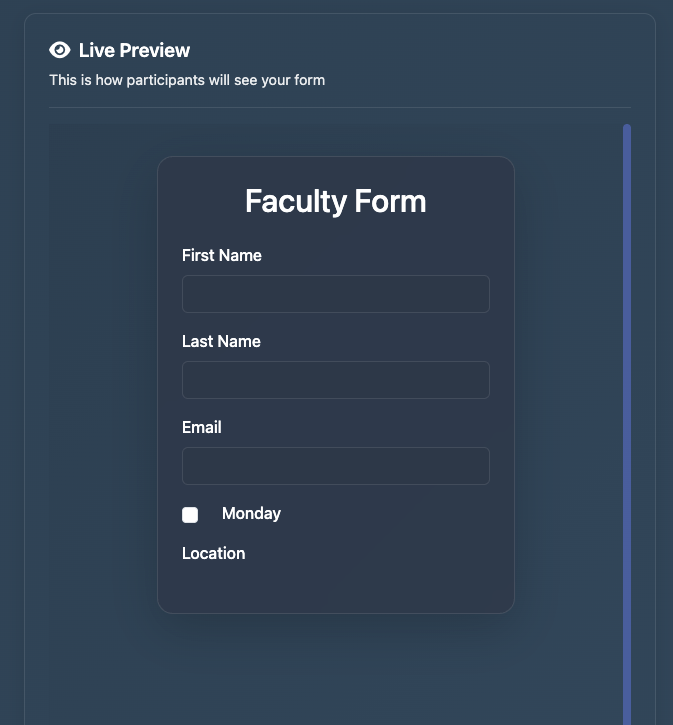
 Click the image to view a larger version of where to find the Preview button.
Custom Email Sender Name and Reply-To Address
Departments can now define the sender name that appears in outgoing emails and specify the email address where replies should be delivered.
This update helps ensure that recipients clearly understand who the message is from and allows responses to be routed to the appropriate departmental inbox.
These new email settings can be found within each department’s configuration area. Departments may adjust the sender name and reply-to address at any time to match internal communication preferences.
-
✓
Clear identification: Emails display the department or program name.
-
✓
Direct communication: Replies go to the designated department address.
-
✓
Process alignment: Supports existing communication workflows.
-
✓
Consistent messaging: Outgoing emails match institutional practices.
Available Options
In the Email Settings section of each department, administrators can configure:
- Sender name: The name shown to recipients.
- Reply-to email: The inbox where responses are delivered.
Outgoing messages continue to be sent securely through ScheduleGenius while using the selected departmental identity.
 Click the image to view a larger version of the email settings.
 Click the image to view a larger version of where to find the department settings.
Availability
These features will be available to all departments as part of next week's platform update.
Open ScheduleGenius